How to Improve Website Speed for Canadian SEO and Boost Rankings

The first time I watched a client lose rankings overnight, it wasn’t because of backlinks or content gaps. It was website speed for Canadian SEO. Their pages took just over four seconds to load in Toronto—barely noticeable on paper, but enough for users to leave and for Google to quietly push them down.
For example, many Toronto-based e-commerce sites have seen notable improvements in page load time after optimizing images and implementing caching. Similar Core Web Vitals enhancements across regions often result in higher user engagement and lower bounce rates.
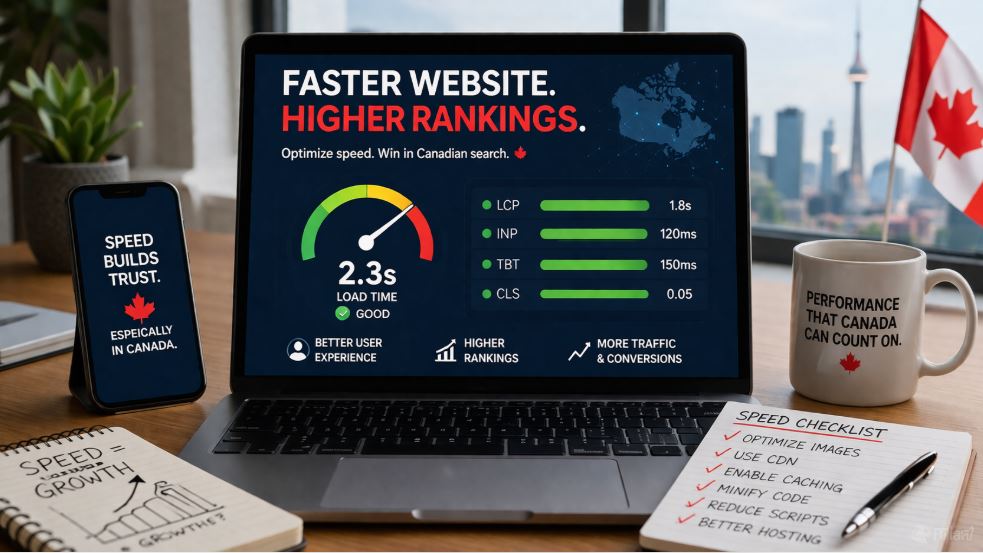
Most companies don’t realize it, but site speed isn’t just a developer concern. In competitive search results, faster pages can make the difference between being seen and being ignored.
At Digital Marketing CDN, we’ve worked with local service businesses across Toronto, Vancouver, and Calgary, and one thing is consistent—when a site loads faster, people stay longer, interact more, and are more likely to trust the business from the first visit.
In this guide, we’ll show exactly how Canadian businesses can fix speed issues, improve Core Web Vitals, and reclaim rankings—without guesswork or gimmicks.
Quick Website Speed Checklist
Start with this checklist to tackle the biggest speed issues first, then follow the detailed steps below to maximize performance and rankings:
- Keep page load time under 2.5 s.
- Use a CDN with Canadian edge servers
- Optimize images (WebP or AVIF)
- Enable browser and server-side caching
- Minify CSS and JavaScript
- Reduce unnecessary third-party scripts
- Fix redirect chains and broken links.
If you’re not sure how your site performs in Canadian cities, a quick audit can reveal hidden speed issues affecting your rankings
Page Speed Impact on Canadian Audiences
Page speed for local users determines how quickly your content loads across different regions. Faster-loading websites improve user experience, reduce bounce rates, and signal to search engines that your pages deserve higher rankings in competitive local search results.
Common Oversights in Site Performance Optimization
Most speed optimization advice focuses on tools and scores—but rankings don’t improve because of scores alone.
A site can score 90+ on PageSpeed and still struggle to rank if real users experience delays on mobile networks or in specific regions.
The biggest gap we see is this: businesses optimize for test results, not for actual user experience across locations like Toronto, Vancouver, or smaller regions where latency behaves differently
Why Website Speed Matters More for Local Users
In Canada, users are accustomed to fast, seamless online experiences, which raises the bar for website performance.
1. Zero Tolerance for Slow Websites
With widespread fiber and 5G, Canadian users don’t tolerate delays. According to recent industry benchmarks, pages that load in under 2 seconds see up to 35% higher conversion rates compared to slower sites.
A delay of even one second can quietly increase bounce rates—especially for high-intent searches like “emergency plumber Toronto” or “best mortgage rates Canada.”
2. Google Prioritizes Fast Websites
Since Core Web Vitals became part of Google’s ranking signals, performance is no longer optional.
Google prioritizes fast-loading websites because they deliver better user experience signals, such as lower bounce rates and longer dwell time, which directly influence rankings.
3. Mobile-First Indexing Is the Default Reality
Over 80% of Canadian searches now happen on mobile devices, and Google indexes your mobile version first.
If your mobile speed lags, your rankings follow.
How to Check Your Website Speed
Before optimizing, you need real data—not assumptions.
Best Tools to Test Website Speed
- Google PageSpeed Insights (Core Web Vitals focus)
- GTmetrix (Canadian server testing)
- WebPageTest (location-based performance)
- Pingdom (user-experience timing)
For example, a Montreal service provider used GTmetrix with a Toronto server test and reduced TTFB from 1.8s to 0.9s by switching to a Canadian CDN.
Key Metrics to Track (LCP, INP, TBT)
- Largest Contentful Paint (LCP)
- Interaction to Next Paint (INP)
- Total Blocking Time (TBT)
If you don’t know these numbers, you’re optimizing blind.
Actionable Tips to Boost Page Performance
Here’s a practical approach that consistently delivers results.
Optimize Images Without Losing Quality
Heavy images are still the #1 cause of slow Canadian business websites.
What works now:
- Convert images to WebP or AVIF
- Compress before upload (not after)
- Use responsive image sizing
Even small improvements in load time can lead to better engagement and more consistent rankings over time.
Real-world impact:
One Toronto-based e-commerce store reduced load time from 5.1s to 2.3s by optimizing image delivery alone.
Use a CDN for Canadian users
A content delivery network isn’t optional anymore—it’s essential.
When someone searches in Vancouver, your site shouldn’t load from a server in Texas.
A properly configured CDN:
- Reduces latency across provinces
- Improves Time to First Byte (TTFB)
- Stabilizes performance during traffic spikes
In many cases, CDN configuration delivers a bigger performance boost than expected—especially across different regions.
Fix Your Hosting First
You can optimize everything else perfectly—but bad hosting will still slow you down.
Look for:
- Canadian or North American–optimized servers
- SSD or NVMe storage
- Built-in server caching
- Low TTFB benchmarks
Cheap hosting often costs more in lost rankings than it saves.
Minify CSS and JavaScript Safely
Removing unnecessary code reduces file size and speeds up rendering.
Focus on:
- CSS and JavaScript minification
- Reducing unused scripts
- Deferring non-critical JS
Over-optimization can break layouts or tracking. Test every change.
Enable Smart Caching
Caching isn’t just about speed—it’s about consistency.
Set up:
- Browser caching for returning visitors
- Server-side caching for dynamic pages
- Object caching for database-heavy sites
For Canadian e-commerce sites, this alone can cut load times in half.
Reduce Third-Party Scripts
Every tracking tool, chat widget, or marketing pixel adds weight.
Audit your site:
- Remove unused plugins
- Replace heavy tools with lightweight alternatives
- Combine tracking scripts where possible
Most sites are running 30–40% more scripts than they actually need.
Fix Redirect Chains
Redirects slow down navigation and waste crawl budget.
Fix:
- Broken internal links
- Old redirect chains
- Duplicate URL paths
Even small improvements here can boost crawl efficiency for Canadian SEO.
Localized Performance Optimization
Here’s where most guides stop—but this is where rankings are actually won.
Optimizing for local search isn’t just about keywords like:
- “digital marketing agency Canada”
- “SEO services Toronto pricing”
- “local SEO Vancouver business”
It’s about how fast your site loads in those exact regions.
Google measures real user data (CrUX), not lab tests.
If your site is fast globally but slow in Montreal, you’ll still lose rankings there.
What High-Performing Canadian Websites Do Differently
Analyzing top-ranking sites shows a clear pattern:
- Load in under 2.5 seconds on mobile
- Use region-aware CDN delivery
- Keep page weight under 2MB
- Limit third-party scripts aggressively
- Optimize for real-user metrics (not just scores)
That combination—not just “speed tips”—is what drives results.
Frequently Asked Questions (FAQs)
What is the ideal website speed for SEO?
The ideal load time is under 2–3 seconds on mobile. Faster websites tend to rank higher because they improve user engagement and Core Web Vitals performance.
Does website speed affect Google rankings?
Yes. Website speed is a confirmed ranking factor. Google uses performance metrics like Core Web Vitals to evaluate user experience, which directly impacts rankings.
How can I test my website speed for Canadian users?
Use tools like GTmetrix or WebPageTest and select Canadian locations such as Toronto or Vancouver to get accurate performance data.
Is a CDN necessary for Canadian SEO?
Yes. A CDN improves load times by serving content from servers closer to Canadian users, reducing latency and improving search performance.
Why is my website slow, even with good hosting?
Common causes include unoptimized images, excessive scripts, lack of caching, and poorly configured themes or plugins.
Key Takeaways for Faster Sites and Higher Rankings
Website speed isn’t a checklist—it’s a competitive edge.
In Canada’s search environment, where users expect instant results and Google measures real-world performance, even small delays can cost visibility, traffic, and revenue.
The brands that win aren’t just optimizing content—they’re optimizing experience.
And increasingly, that experience starts with how fast your website responds the moment someone clicks.
If you fix that, everything else—from rankings to conversions—gets easier. If your website feels slow to users in Canada, it’s worth taking a closer look—because even small delays can quietly impact your visibility and conversions.